
API keys and settings
Add API keys to your app
Some apps talk to other services, like an email sender or an AI model. Their keys go in your project's Settings tab, never in the chat.
Add a variable
- Open your project and tap the gear above the preview to open Settings.
- Press Add Your First Variable (or Add Variable), then type the name, like
RESEND_API_KEY, and paste the value. - Press Save Environment Variables. Your preview picks it up right away.
- Put your app online again so your live site uses it too.
Not sure which name to use?
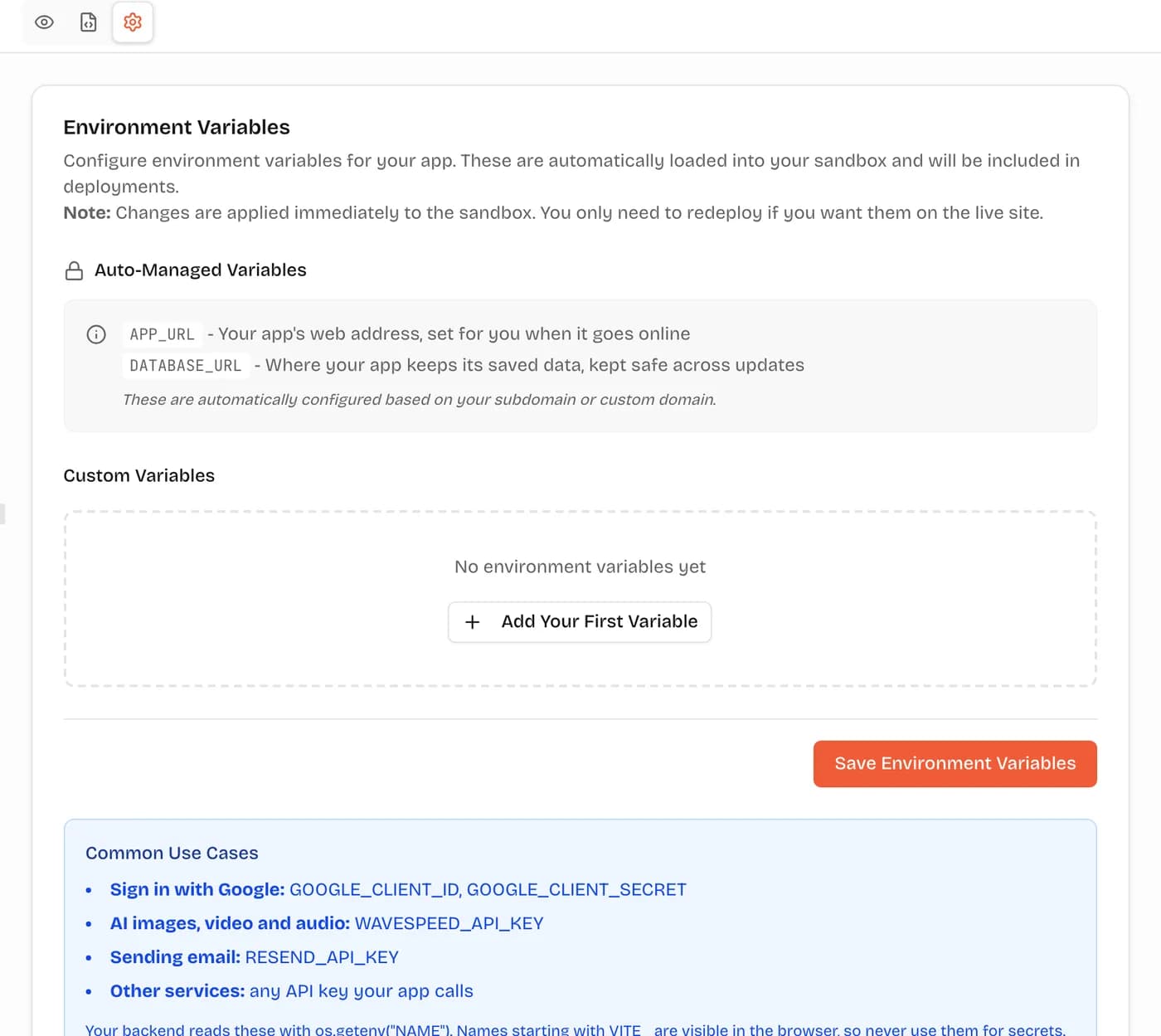
What's set for you, and what you add
VibeDream fills some values in for you. They depend on what you're building:
Apps (React + FastAPI)
Set for you
APP_URLYour app's web address, set for you when it goes onlineDATABASE_URLWhere your app keeps its saved data, kept safe across updates
Common keys you add
- Sign in with Google:
GOOGLE_CLIENT_IDGOOGLE_CLIENT_SECRET - AI text, images and video:
OPENROUTER_API_KEY - Sending email:
RESEND_API_KEY - Other services: any API key your app calls
Your backend reads these with os.getenv("NAME"). Names starting with VITE_ are visible in the browser, so never use them for secrets.
Games (Phaser)
Set for you
VITE_VIBEDREAM_API_URLConnects your game to VibeDreamVITE_VIBEDREAM_GAME_TOKENSaves scores to your game's leaderboard
Common keys you add
- Public settings for your game:
VITE_GAME_TITLEVITE_ANALYTICS_ID
Games run fully in the browser, so every variable is visible to players. Only add VITE_ names and never add secret keys.
Older projects (Next.js)
Set for you
NEXT_PUBLIC_APP_URLYour app's web address, set for you when it goes onlineNEXTAUTH_URLUsed for sign-in redirects
Common keys you add
- Sign in:
GOOGLE_CLIENT_IDGOOGLE_CLIENT_SECRETGITHUB_IDGITHUB_SECRET - AI text, images and video:
OPENROUTER_API_KEY - Sending email:
RESEND_API_KEY - Other services: any API key your app calls
Names starting with NEXT_PUBLIC_ are visible in the browser, so never use them for secrets.
Keep secrets secret
- Never paste secret keys into the chat. Add them in Settings instead.
- Names starting with
VITE_(orNEXT_PUBLIC_in older projects) end up in the page, so anyone can read them. Only use them for public values. - Games run fully in the browser, so don't give them secret keys at all.
Common questions
Where do I add an API key?
Open your project, tap the gear (Settings) above the preview, add the name and value, then press Save Environment Variables.
Is it safe to paste secret keys there?
Yes, as long as the name does not start with VITE_. Your backend reads secrets on the server. Names starting with VITE_ are built into the page, so anyone can see them.
Do changes apply right away?
They apply to your preview immediately. Put your app online again to use them on your live site.
More guides
- Getting startedDescribe an app or game and watch it come to life.
- TemplatesStart from a ready-made page and change anything.
- Put it onlineFree web address, your own domain and GitHub.
- Your own domainConnect a domain you own with two DNS records.
- File uploadsLet people upload images, documents and videos.
- Video guidesShort walkthroughs of each step.
- What is vibe coding?The idea behind building by describing.
- Get helpTalk to a real person about your project.