
You can build internal tools with AI by describing the screens, the data and the rules to an AI app builder, testing the result on the awkward cases your team will hit, then adding a login and putting it on its own address. Approval forms, stock trackers and admin lists suit this well, because they are mostly forms and tables with clear rules. The worked example below is an inventory tracker for a coffee roaster with two locations, with a note at the end on when Retool is the better tool.
What counts as an internal tool
An internal tool is software your own team uses to run the business, not something customers see. In many small companies these live in spreadsheets and chat threads, and they break in familiar ways: two people edit the same row, nobody knows which version is current, and nobody can say who approved what. A small purpose-built app gives each task one screen and one place where the data lives.
- It has a small, known set of users, often under fifty.
- It is mostly forms, tables, statuses and a few charts.
- It enforces a process: who can submit, who approves, what happens next.
- It changes often, because the process changes.
Ten examples
- Inventory tracker: stock levels by location, low-stock alerts, a log of every change.
- Purchase approvals: request, manager approve or reject, finance mark as paid.
- Time-off requests with a team calendar view.
- A customer CRM with deals on a pipeline board. See how to build a no-code CRM.
- Equipment checkout: who has which laptop or camera, and when it is due back.
- Job tracker for a trades business: quote, booked, in progress, invoiced.
- Content calendar: ideas, drafts, review, scheduled.
- Onboarding checklist per new hire, with tasks for IT, the manager and HR.
- Order lookup for support staff that shows status from your existing system.
- A daily numbers dashboard that pulls a few figures into one page.
An inventory tracker, built step by step
The example is a small coffee roaster with two locations that keeps stock in a spreadsheet. The goal is a tracker that shows what is in stock where, warns when something runs low and records every change with who made it.
An internal inventory tracker for a coffee roaster with two locations, Roastery and Shop. Items have name, category (green beans, roasted, packaging, milk and syrups), unit, reorder level and quantity per location. Screens: Stock (table filterable by location and category, low items highlighted red), Adjust stock (pick item and location, add or remove with a reason: delivery, sale, waste, transfer, count), History (every change with date, person, item, location, amount, reason), Items (add or edit items and reorder levels). Transfers move stock from one location to the other in one action. Dashboard with the number of low items per location. Staff must log in; only managers can edit items. Clean and dense, works on a tablet and phone.In VibeDream, tap New Project, choose Direct Prompt and paste it, or start from the Blank Starter template if you want the React and FastAPI skeleton in place first. The live preview appears in seconds. Then test it with the awkward cases your team will hit in the first week.
- Transfer 10 bags from Roastery to Shop. Both locations should change, and History should show one transfer, not two unrelated changes.
- Remove more stock than exists. It should refuse, not go negative.
- Set a reorder level of 5 and drop stock to 4. The item should turn red and the dashboard count should go up.
- Log in as a non-manager and try to edit an item. It should be blocked.
- Use it on a phone in the shop. Buttons should be big enough to tap with gloves on, if that matters to your team.
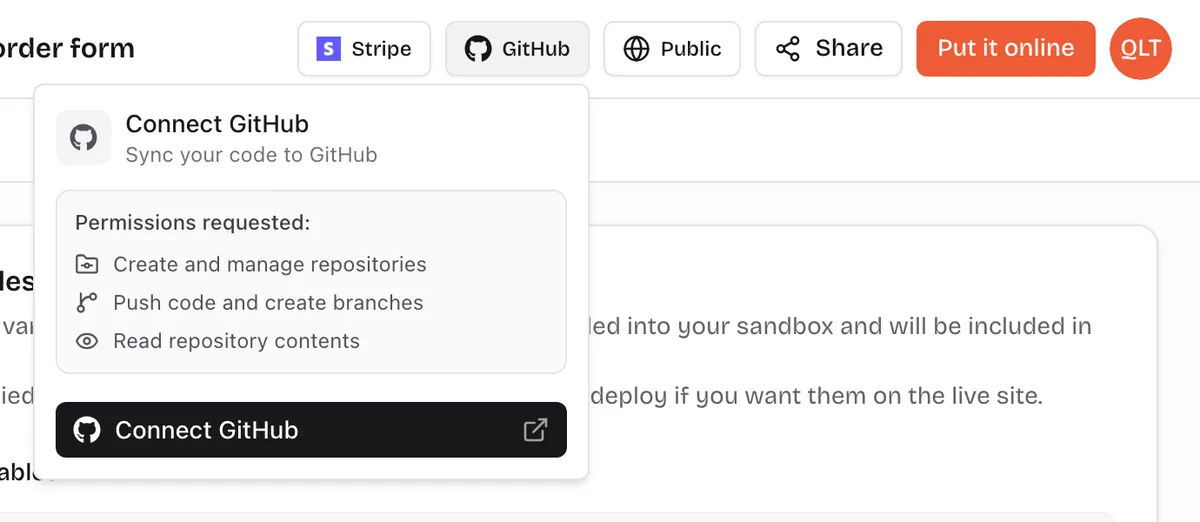
Each problem you find is one short message to fix. When it is right, the code is yours: open the Code tab to read it, download a ZIP, or connect GitHub to sync it to your own repository, as in the screenshot above. That matters for internal tools in particular, because your process will change and you may want a developer to extend it later.
Team login
Internal tools need to know who is using them, both to restrict actions and to record who did what. Put it in the prompt: staff log in with their email, managers can edit items, everyone else can only adjust stock. The AI builds that login into your app's code. You can also tap Add login under the chat to set up email and password sign-in. Start with two roles. Most small teams never need a third.
Put the tool online on its own address, such as stock.yourcompany.com, by adding a TXT and a CNAME record at your registrar; see the deployment guide. Each publish or update costs 5 credits. The address is public, so the login is what keeps it private. Do not put sensitive data in a tool before logins are working.
Connecting existing data
- Spreadsheets: export a CSV and ask for an import screen that maps the columns, then check a sample of rows after import.
- Other software with an API, such as your shop platform or accounting tool: add its API key in project settings, as explained in the API keys guide, and ask the AI to fetch the data from the backend. Keep keys on the server, never in names starting with VITE_.
- Shared files and photos, such as delivery notes: uploads use storage that comes with your plan. See the file uploads guide.
- Company databases: connecting directly to an existing production database is possible with the right credentials, but be careful. Start read-only and test against a copy.
Roll it out to your team
A tool nobody uses is worse than the spreadsheet it replaced. Pick one process, replace it fully and retire the old way on a set date. Running both in parallel for long is how internal tools die. Show the team the tool in ten minutes, ask one person to own feedback and fix the top issues in the first week. Keep a short changelog page inside the tool so people see that their requests turn into changes.
Retool vs AI builders
Retool is a dedicated internal tools platform. Its pricing page lists a no-cost plan for up to 5 users, and a Team plan at $10 per builder and $5 per internal user a month billed yearly (checked 25 October 2026 on retool.com/pricing). Its strengths are ready connectors to many databases and APIs, a large component library and features for larger organisations.
- Pick Retool if your tools mostly sit on top of existing company databases, you have engineers who will maintain them, or you need enterprise access controls and audit features.
- Pick an AI builder like VibeDream if you are starting from spreadsheets, want to describe the tool rather than assemble components, and want to own the code outright.
- Lovable and similar AI app builders sit in the same group as VibeDream: prompt-to-app tools that generate code. Compare them on how they handle logins, data and hosting for your case.
VibeDream pricing is flat per account rather than per user: All Access Mini at $49 a month with 60 credits and up to 3 active projects, or All Access at $97 a month with 150 credits and up to 5. If the tool grows into something customers use, how to build an app covers the next steps.