
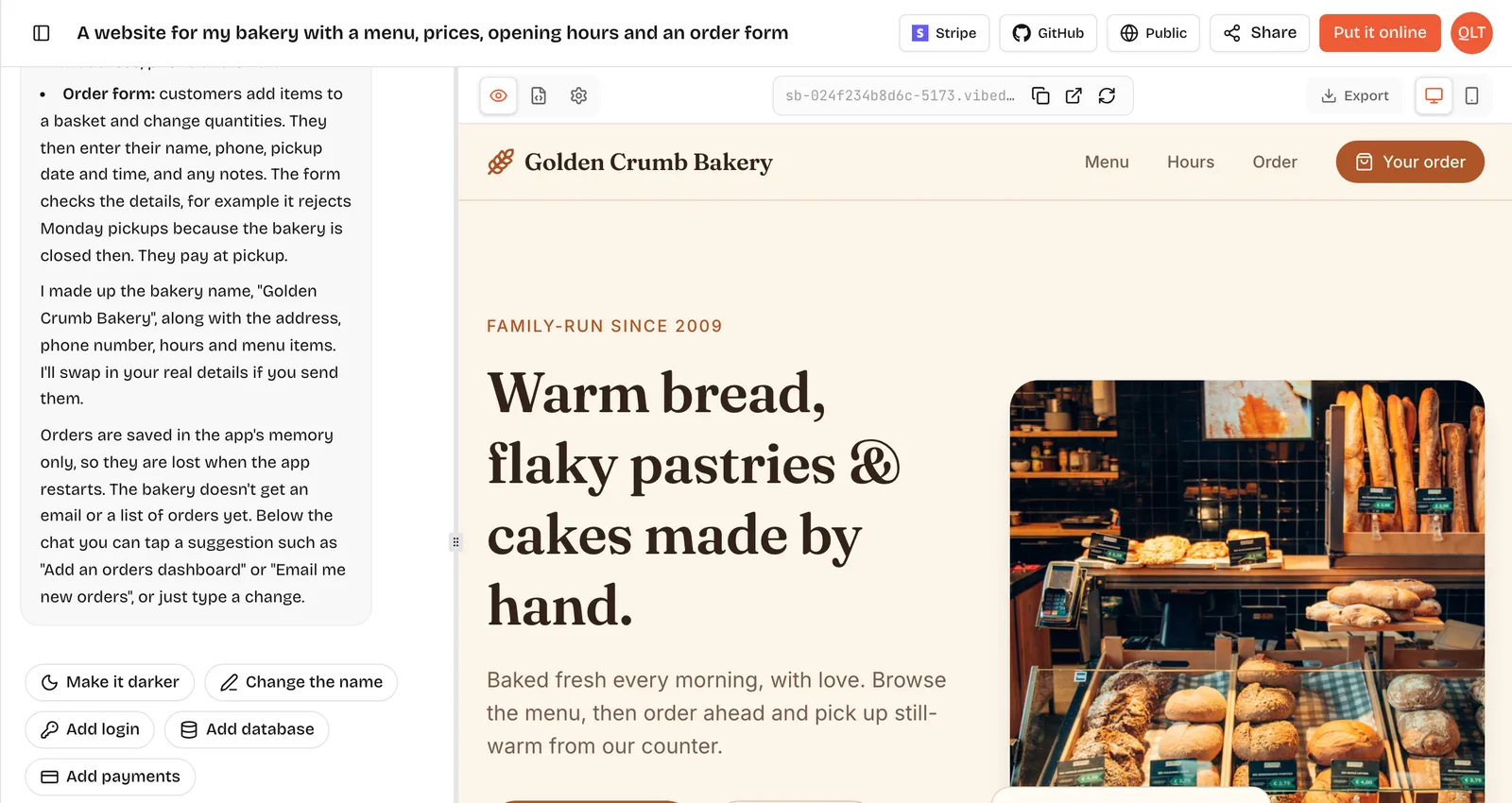
VibeDream is a small business website builder that works from a description instead of a template editor. You write or say a few sentences about your business, your services and the look you want, and it builds a phone-first site with your pages and a form that saves each enquiry. You change it later by typing what should change, such as add Boiler servicing from 80. It suits owners whose business needs something a template does not quite do, like a quote form with their own rules, and who want to own the code. Wix, Squarespace and Durable are compared fairly further down.
How it works
- Sign up and choose a plan. All Access Mini is $49 a month with 60 credits.
- Tap New Project, choose Direct Prompt and describe your business, or pick Use Template and start from the Aesthetic Landing Page, which already has services, pricing, about and contact pages.
- Watch the live preview build beside the chat, as in the screenshot above. A first version of a simple site is usually ready within a few minutes.
- Ask for changes in plain words until it is right. Switch the preview to phone view to check how most customers will see it.
- Tap Put it online. Your site gets a vibedreams.ai address with HTTPS, and you can connect your own domain.
Examples by business type
Small business sites share a core of home, services, about and contact, but the page that wins customers differs by trade. Here is what to emphasise for six common types, with a line you can add to your prompt.
- Plumber, electrician or other trade: service area, emergency number at the top, and a quote request form with photo upload. Prompt line: put a tap-to-call emergency button on every page.
- Cafe or bakery: opening hours, a text menu and directions. See the restaurant website builder guide.
- Salon or barber: a services and prices table and booking requests. See the salon website builder guide.
- Accountant or consultant: services with who they are for, a short process, and a book-a-call form. Prompt line: add a three-step how we work section.
- Law firm: practice areas, attorney bios and an intake form. See the law firm website builder guide.
- Shop with a physical store: opening hours, what you stock, a few photos and directions. Prompt line: add a this week in store section I can update.
What you get
- A multi-page site built as real React and FastAPI code that you can read in the Code tab, download as a ZIP or sync to GitHub.
- Forms that do what you ask, such as saving every quote request to a private page you can check each morning.
- Hosting and a vibedreams.ai address included in the plan. Each publish or update costs 5 credits.
- Your own domain connected with a TXT and a CNAME record, with HTTPS switched on automatically.
- File storage for uploads, such as photos sent with quote requests: 25GB on All Access Mini and 1TB on All Access.
- Human support from the support page or by email if you get stuck.
Edits by prompt
The main day-to-day difference from a template editor is how you change things. Instead of finding the right block and the right setting, you write one sentence. For a plumbing firm, typical edits look like this:
- Add a banner to the home page: closed for staff training on Friday 14th.
- Add a new service, Boiler servicing, from 80, with a short description.
- Make the quote form ask for a postcode and check it is in our service area.
- Add our new van photo to the about page.
- Make the whole site feel a bit more premium: more space, fewer colours.
Changes appear in the preview first. Your live site only changes when you open Put it online and press Update it, so you can try things without customers seeing a half-finished edit.
Compared with Wix, Squarespace and Durable
Each of these suits a different kind of owner. Prices below were checked on 25 October 2026 on each company's own pricing page.
- Wix: a large drag-and-drop editor with thousands of templates and an app market. It has a no-cost plan that shows Wix branding, and paid plans billed yearly at prices that vary by country. Pick it if you like visual editing and want many add-ons.
- Squarespace: polished designer templates and a tidy editor, and a custom domain included for the first year on annual plans. Prices vary by country and billing. Pick it if design-led templates fit your business as they are.
- Durable: an AI website builder aimed at small businesses, with a starter plan at no cost and paid Launch and Grow plans listed at $25 and $49 a month, a little less billed yearly. Its plans include a customer list (CRM). Pick it if you want an all-in-one bundle and a quick generated site.
- VibeDream: builds your site, or a small app, from a description and lets you keep changing it by chatting. You own real code, can sync it to GitHub and can add custom behaviour, like a quote form with your own rules. It does not bundle invoicing or a CRM, and it costs more than the entry plans of the other three. Pick it if your business needs something a template does not quite do.
What to write on each page
The builder handles layout and code. The words are still yours, and they decide whether visitors call. Here is a short brief for each core page that works for most local businesses.
- Home: what you do, for whom and where, in one sentence. Then the main action, such as Call now or Get a quote, and three reasons to choose you that a competitor could not copy word for word.
- Services: one block per service with what it includes, who it is for and a price or starting price where you can.
- About: your name, how long you have done this, a photo of you or your team, and why you started.
- Reviews: link to your reviews where they live, or quote real customers with their permission.
- Contact: address, map, hours, phone, email and a short form. Say how quickly you reply.
Write it in a plain document first and paste it in page by page. Ask the AI to fit your text to the design rather than write it from nothing. It is faster to edit a few sentences than to rewrite generic copy that sounds like every other business.
When a template site is enough
If your needs are a few pages of text, photos and a contact form, any of the builders above will do, and the cheapest one that you enjoy using is the right one. The case for VibeDream gets stronger as soon as you need something specific to your business, such as a quote calculator, a booking rule, an internal list of jobs or a client page, because you can describe it rather than search for a plugin that almost fits.
Pricing
VibeDream has two public plans. All Access Mini is $49 a month or $297 a year, with 60 credits a month, up to 3 active projects and 25GB of storage. All Access is $97 a month or $497 a year, with 150 credits a month, up to 5 active projects and 1TB of storage. Building and editing use credits, and each publish or update is 5 credits. Connecting a custom domain uses no credits. Hosting and HTTPS are included. Current details are on the pricing page.
If you have never built a site before, how to build a website explains the planning steps that matter on any platform, and the getting started guide shows the VibeDream workspace in detail.