
The surest way to learn how to build an app is to finish a small one. Decide first whether it has to be a native phone app or can be a web app. Cut the idea down to one job, build that first version with code, a no-code tool or AI, then hand it to five people who match your user and fix whatever confuses them before you launch. Most first apps stall because they try to do ten things, rarely because of the tool. The running example below is a small app for a dog walker to manage clients and walks.
Web app or native app first
A native app is installed from the App Store or Google Play. A web app opens in a browser at a link, on a phone or a computer. Native apps can use more of the phone, such as background location, Bluetooth and some notification features, but they need store review, separate builds for iOS and Android, and developer accounts with the stores.
For a first version, a web app is usually the faster and cheaper choice. You share a link, people use it straight away and every update reaches everyone at once. Start with a web app if your idea is mostly forms, lists, dashboards, bookings, calculators or content. Think about native from day one only if the core of the idea needs phone hardware, like tracking a run in the background.
VibeDream builds web apps that run in the browser and work well on phones. It does not make native iOS or Android apps for the stores.
Plan the first version
Write the idea as one sentence: this app helps a [who] do [one job] without [current pain]. For the example: this app helps a dog walker see today's walks and each dog's notes without digging through messages. Then list everything you imagine it doing, and cross out all but the three to five things the one sentence needs.
- Keep: a list of clients and their dogs, a schedule of walks by day, notes per dog (keys, allergies, quirks), and marking a walk as done.
- Later: invoices, a client login, photo updates, route maps, reminders.
- Sketch the screens on paper. Three to five screens is a good size for version one.
- Write down what data the app saves. Here: clients, dogs, walks. Each with a handful of fields.
Pick a route
- Write the code. Native with Swift or Kotlin, cross-platform with React Native or Flutter, or a web app with a framework like React plus a backend. You get the most control and the slowest start, and you run the hosting.
- No-code builders such as Bubble, Glide or FlutterFlow. Visual editors where you place screens and connect data. Faster than coding, but you learn each tool's own logic, and what you build mostly lives inside that platform.
- AI builders such as VibeDream. You describe the app in words and the AI writes the code. Fastest start for most small apps, and on VibeDream you get real React and FastAPI code you can download or sync to GitHub.
A fair rule of thumb: if you want a career in development, write the code. If your app is a standard pattern that a no-code template already covers, a no-code tool is fine. If your app is a custom little tool and you would rather explain it than assemble it, try AI first. Many people mix routes: they build a first version with AI, then a developer extends the code.
Build it with VibeDream
Sign up, tap New Project and choose Direct Prompt, or pick Use Template and start from the Blank Starter, which has the frontend and backend already connected. You can type, record a voice note, or attach a photo of your paper sketch. A first prompt for the example:
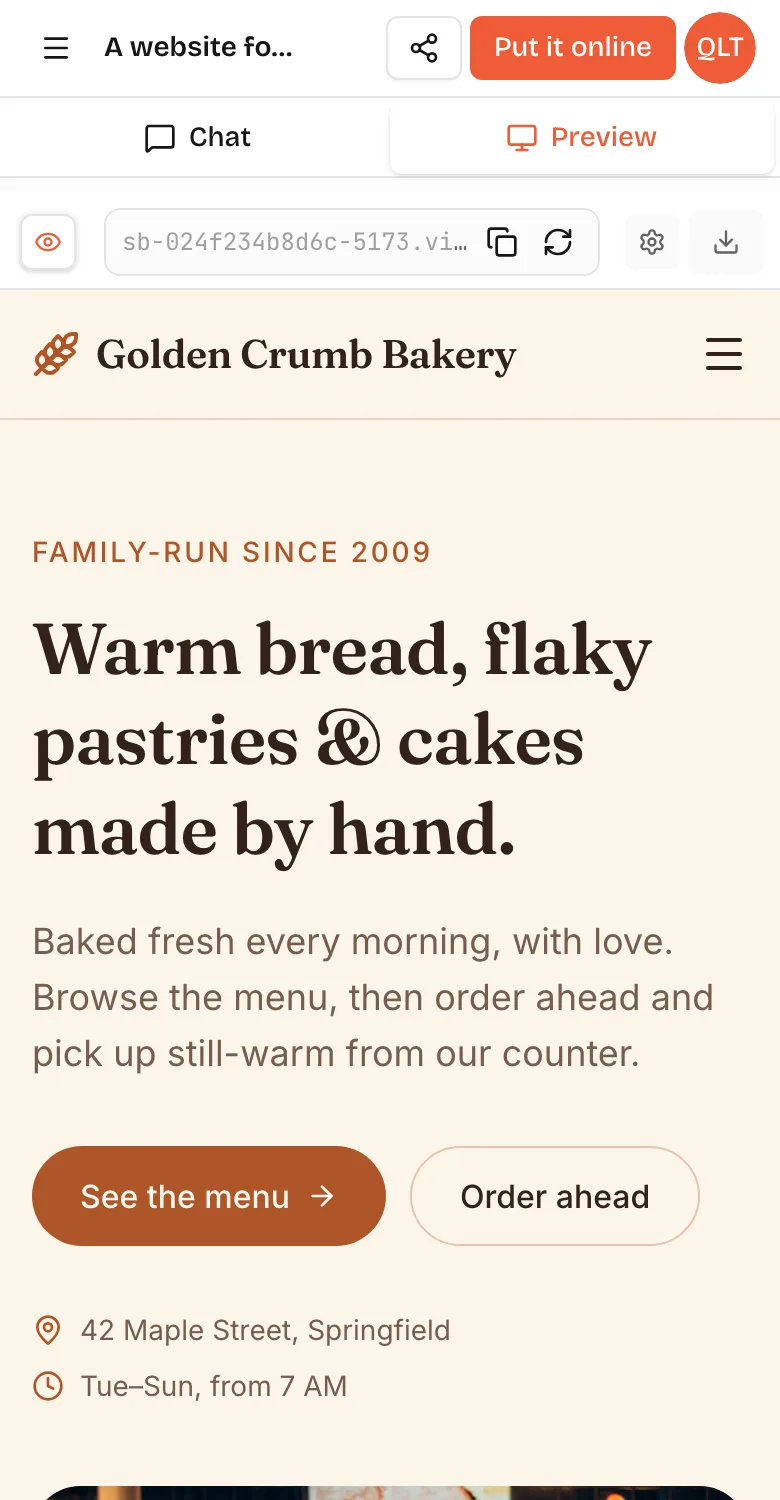
A web app for a dog walker. Screens: Today (walks for today in time order, each with the dog's name, address and a Done button), Clients (list of owners with phone and their dogs), Dog profile (photo, notes, key location, allergies), and a form to schedule a walk. Simple and friendly, big tap targets, works one-handed on a phone. Save everything so it is still there tomorrow.A live preview starts in seconds and fills in as the AI builds. The first version of a simple app like this is usually ready within a few minutes. Then you click through it as if you were the dog walker. Add a client, schedule a walk, mark it done, reload the page and check the data is still there. On a phone, the Chat and Preview tabs at the top let you switch between talking to the AI and using the app, as in the screenshot above.
- Make the Done button green and show a tick when tapped.
- Sort Today by time and show tomorrow's walks underneath, greyed out.
- Add a search box to Clients.
- On the dog profile, put allergies in a red box at the top.
Each of those is one message. If something breaks, copy the error, paste it in and ask for a fix. The detailed prompt-by-prompt version is in how to build an app with AI.
Add saved data and login
Apps differ from websites mainly because they remember things and know who is using them. In VibeDream you ask for both in plain words: save every walk so it is still there tomorrow, and put the app behind a simple login with one password for me. The AI writes that into your app's own backend. You can also tap Add login or Add database under the chat, and VibeDream sets them up for you. Client logins can wait until version two.
If the app needs a secret key for another service, such as a text message provider, add it in project settings, never in the chat or the code. The API keys guide shows where.
Test it with five real users
Five people who match your user will usually show you the worst problems. Give each one a task, such as schedule a walk for Bella next Tuesday at 3pm, and watch without helping. Note where they hesitate, what they tap that does nothing and what words confuse them. Then fix the top three problems and test again with someone new. Resist adding features at this stage. Confusion is usually fixed by removing or renaming things.
Launch and get a domain
In VibeDream, press Put it online, pick a name and confirm. Your app goes live at an address like dogwalks.vibedreams.ai with HTTPS on, usually within one to three minutes. Each publish or update costs 5 credits, and hosting is included in the plan. To use your own domain, add the TXT and CNAME records shown to you at your registrar, using the www or an app subdomain, and HTTPS switches on automatically. The deployment guide covers each step.
VibeDream plans start at $49 a month (All Access Mini, 60 credits, up to 3 active projects). The code stays yours on any plan, so you can download a ZIP or sync it to GitHub whenever you like. Details are on the pricing page.