
How to build a website, in short: decide what a visitor should do after reading it, plan three to six pages, write the words, then make it one of three ways: write the code yourself, use a drag-and-drop site builder, or describe the site to an AI that builds it. Every route ends the same way. You put the site on a host, point a domain at it, turn on HTTPS and check it on a phone. The example throughout is a small bakery that needs a home page, a menu, opening hours and a contact form.
Pick a route before you start
Most people stall because they start with a tool and only later work out what they need. Look at the three routes side by side first.
- From scratch with HTML, CSS and a little JavaScript. Cost: a domain and cheap hosting. Time: days to weeks if you are learning. Best for people who want to learn web development or need full control.
- A site builder such as Wix or Squarespace. Cost: a monthly plan. Time: a weekend for a simple site. Best for people who are happy picking a template and moving blocks around inside one company's editor.
- An AI builder such as VibeDream. Cost: a monthly plan that includes credits and hosting. Time: a first version in minutes, then an hour or two of edits. Best for people who would rather describe the site in words and still own real code at the end.
If you want to become a developer, the scratch route teaches you things the other two hide. If you want a site this week and never want to see code, a builder or an AI tool will get you there faster.
Plan the pages and the words first
A website is mostly words and photos. The tool matters much less than what you put in it. Before you open any editor, write down the answer to one question: what should a visitor do after reading the site? For the bakery, the answer is visit the shop or order a cake. Every page should push toward that.
- Home: one sentence that says what you do and where, a photo, and the main action (call, visit, book, order).
- Menu, services or products: the actual list with prices. This is the page people look for most.
- About: who you are, in a short paragraph. Real names and faces build trust.
- Contact: address, map, opening hours, phone and a simple form.
- Legal pages if you collect any personal data. A privacy policy and terms can be drafted with the privacy policy generator and terms generator, then checked against your local rules.
Write the text in a plain document now. It is far easier to paste finished words into a site than to write them inside an editor while fighting with layout. Gather five to ten good photos at the same time. Phone photos taken in daylight are fine.
Route one, write it from scratch
Building from scratch means writing the files a browser reads. HTML holds the content, CSS controls the look, and JavaScript adds behaviour such as a menu that opens on a phone. A five-page bakery site needs no framework at all.
- Install a code editor such as VS Code and create a folder with index.html, menu.html, about.html, contact.html and a styles.css file.
- Write the shared header and footer once, then copy them into each page. This is the part frameworks later automate.
- Use CSS flexbox or grid for layout, and add a media query so the menu stacks on narrow screens.
- For the contact form, plain HTML cannot send email by itself. You need a form service or a small backend.
- Upload the folder to a static host, then connect your domain.
The real cost here is time. Learning enough HTML and CSS to make a site that looks good on phones takes most beginners a few weekends. The payoff is that you understand every line, and you can host it almost anywhere for very little.
Route two, use a site builder
Site builders give you a library of templates and a visual editor. You pick a design close to what you want, replace the text and photos, and press publish. Wix and Squarespace are the best-known; both offer monthly plans, and prices change by country, so check their own pricing pages for your region. Checked: Oct 2026.
The strength is speed for simple sites. The trade-offs are that you work inside one company's editor, you cannot take the site's code with you if you leave, and anything the template does not support, such as a custom order form with your own rules, means hunting for an app or a workaround.
Route three, describe it to an AI
With an AI builder you skip the editor and write what you want. In VibeDream you tap New Project, choose Direct Prompt and type, record a voice note, or attach a screenshot of a site you like. You can also start from the Aesthetic Landing Page template and ask the AI to turn it into a bakery site. For the bakery, a first prompt might look like this.
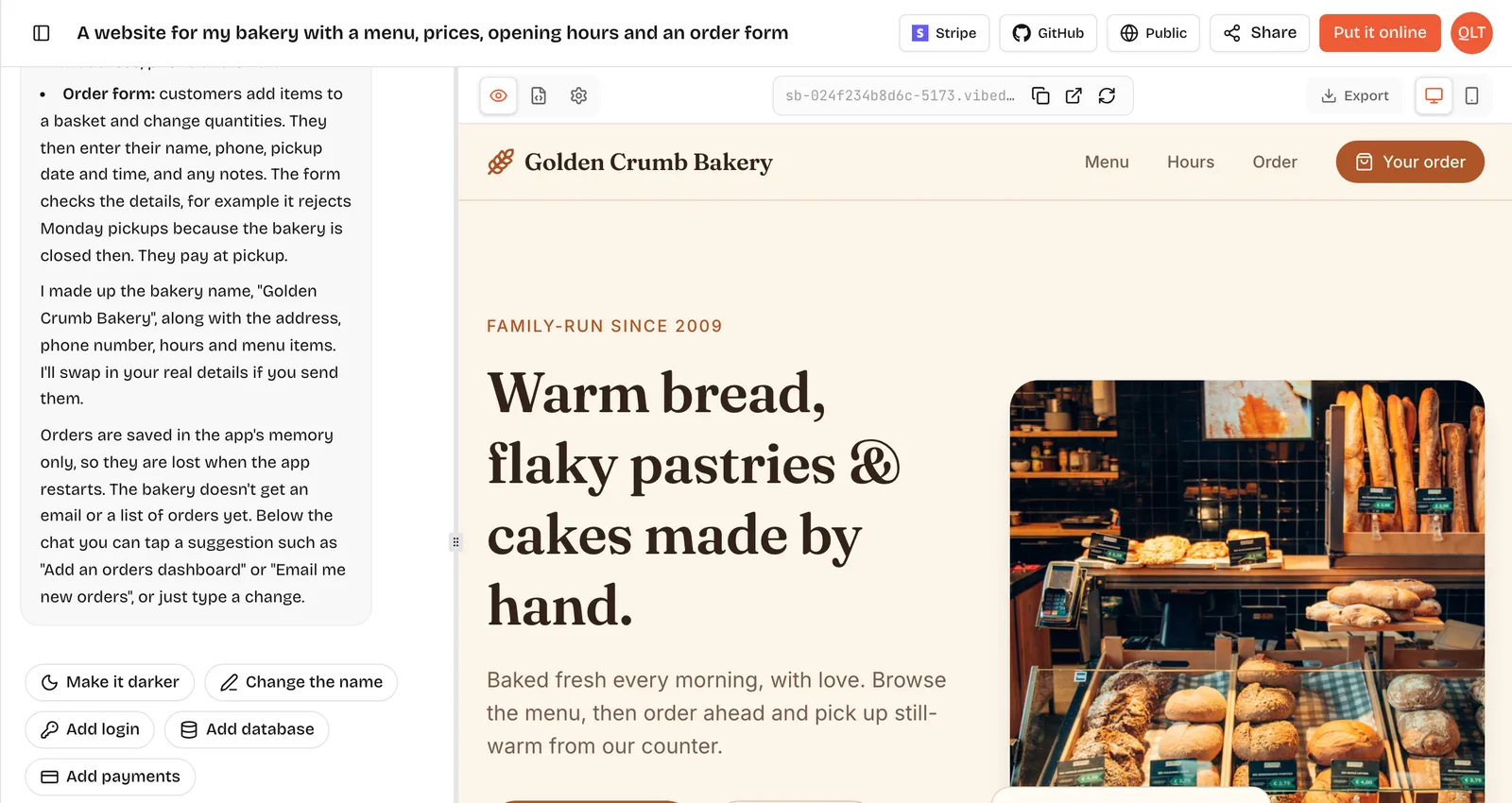
A website for Rosie's Bakery in Leeds. Pages: home, menu with prices, about, contact. Warm cream background, dark brown text, a big photo of bread on the home page. Opening hours Tue to Sat 7am to 4pm. A contact form with name, email and message. Make it look good on phones first.A live preview appears beside the chat and fills in as the AI works. You then edit by talking: make the header darker, move the opening hours to the top, add a cake order page. You can switch the preview between desktop and phone views to check both. The screenshot at the top of this page shows that workspace with a bakery site in the preview.
What you get is real code: a React frontend with a FastAPI backend. You can read every file in the Code tab, download it as a ZIP or sync it to your own GitHub repository. The step-by-step version of this route, with prompts for each stage, is in how to build a website with AI.
Domain, hosting and HTTPS
To be reachable, a site needs a host that serves the files, a domain people can type and HTTPS so browsers show the padlock. How you get them depends on the route.
- From scratch: buy a domain from a registrar, pick a static host, and follow the host's steps to add DNS records and switch on HTTPS.
- Site builder: hosting is part of the plan, and the builder walks you through connecting a domain.
- VibeDream: press Put it online, pick a name and your site goes live at an address like your-site.vibedreams.ai with HTTPS already on. Each publish or update costs 5 credits, and hosting is included in the plan. To use your own domain, add the TXT and CNAME records shown to you at your registrar, and HTTPS switches on automatically. The deployment guide has the full steps.
One detail that trips people up: on VibeDream, root domains like mybakery.com are not supported yet, so you connect www.mybakery.com and set your registrar to forward the bare domain to www. Most registrars have a forwarding setting for exactly this.
What it costs
The scratch route is the cheapest in money and the most expensive in time. A domain is usually a small yearly fee, and simple static hosting is cheap or included with many developer tools. Site builders charge a monthly plan, with the price depending on the plan and country. VibeDream plans are All Access Mini at $49 a month with 60 credits and All Access at $97 a month with 150 credits. Building uses credits, and each time you put the site online or update it costs 5 credits. See pricing for current details.
Launch checklist
- Open every page on your own phone as well as in the desktop preview.
- Send yourself a test message through the contact form and confirm it arrives where you expect.
- Check the opening hours, phone number and address against what is on your Google Business Profile. They should match exactly.
- Give each page a clear title and a one-line description so search results read well.
- Compress large photos. A slow first page loses visitors on mobile data.
- Ask two people who have never seen the site to find your prices and your phone number. Watch where they get stuck.
Once it is live, keep it alive. Update the menu when prices change and remove events that have passed. A menu with last year's prices does more harm than a short page with the right ones.