
A subdomain is an extra name placed in front of a domain and separated by a dot, such as blog.example.com or app.example.com. It works like its own address and can point to a completely different website or server, while still sitting under the domain you own. The www in www.example.com is a subdomain too. You create subdomains in your domain's DNS settings, and they do not cost anything extra to add.
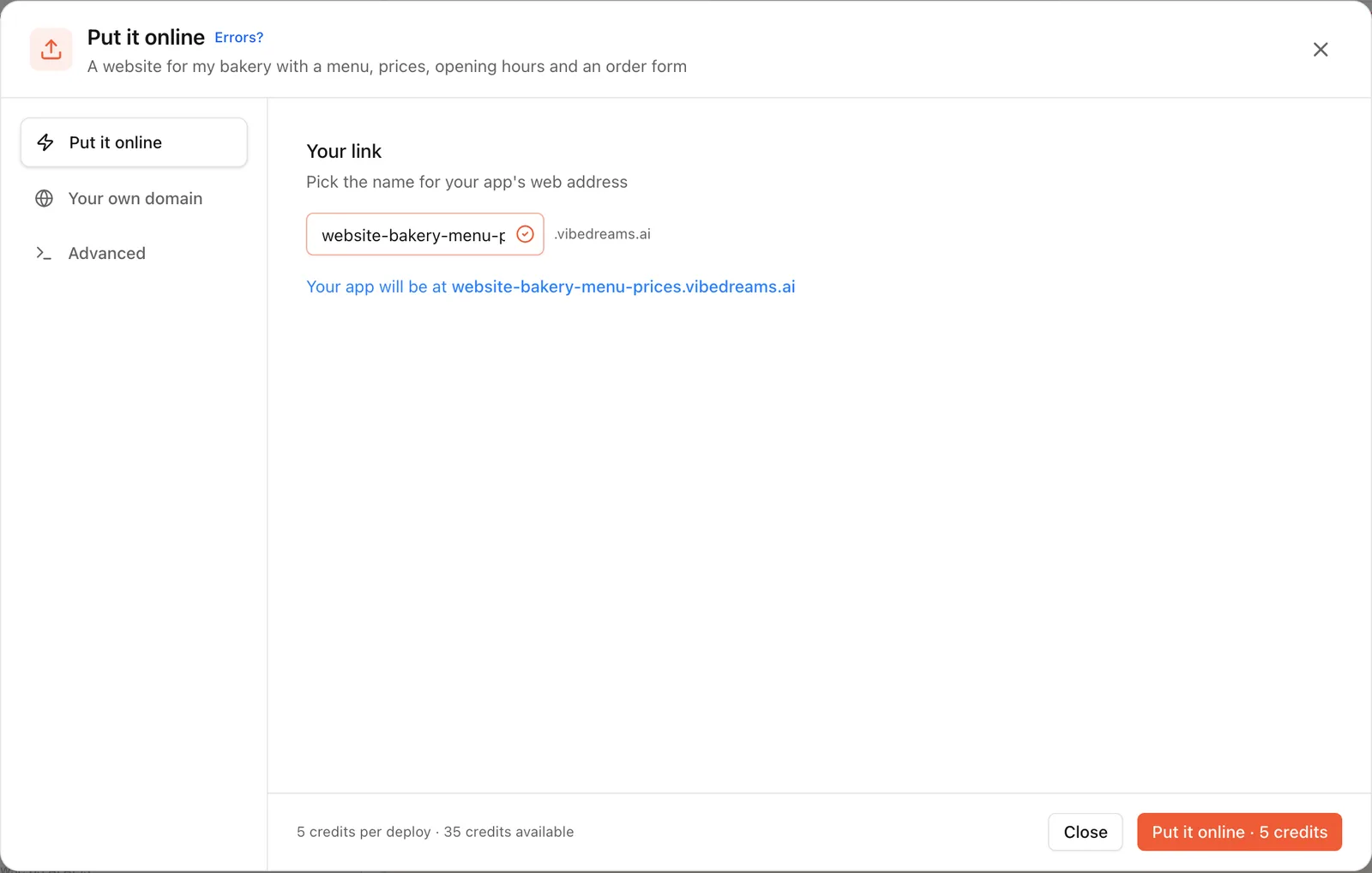
App builders use subdomains to give every project an address straight away. When you put an app online on VibeDream, it gets one like fluffycuts.vibedreams.ai, where fluffycuts is your subdomain and vibedreams.ai is the platform's domain.
How a web address is built
Read an address from right to left and it makes sense.
- The top-level domain, or TLD, is the ending: .com, .org, .ai, .co.uk.
- The domain is the name you register plus the ending: example.com. This is what you pay a registrar for each year.
- The subdomain is anything added in front: www, app, shop, help. You can have many, and even nest them, like eu.app.example.com.
- The path comes after the first slash: example.com/blog/post. That is a folder on one site, not a separate address.
So in https://app.example.com/settings, app is the subdomain, example.com is the domain and /settings is the path. The https:// at the start is the protocol, which tells the browser to use an encrypted connection. Nothing about the subdomain changes that: every subdomain needs its own HTTPS certificate, which most hosts now issue for you.
Subdomain vs domain vs folder
These three are often mixed up, and the choice affects setup and search.
- Separate domain, like examplebooks.com: a different name you register and renew on its own. Use it for a separate brand.
- Subdomain, like books.example.com: same registered domain, but it can point to a different host. Use it for a separate app, region or tool under one brand.
- Folder, also called a subdirectory, like example.com/books: same site and same host. Use it for content that belongs to the main site, such as a blog or help articles.
A subdomain is set up in DNS. A folder is set up inside your website. That is why tools that run on their own servers, such as a help desk, a status page or a web app, usually live on subdomains: the main site does not need to host them.
Common subdomain examples
- www.example.com: the classic website address. Many sites use it as the main version and forward the bare domain to it.
- app.example.com: the logged-in product, kept separate from the marketing site.
- blog.example.com: a blog on a different platform from the main site.
- shop.example.com: an online store hosted by an ecommerce platform.
- help.example.com or docs.example.com: support articles.
- status.example.com: an uptime page hosted elsewhere so it works when the main site is down.
- staging.example.com: a test copy that is not linked publicly.
SEO notes
Search engines can rank subdomains and folders well. Google has said for years that it handles both, so neither choice is a ranking trick. What matters more is practical.
- Content that belongs together, like a blog that supports your main site, is easiest to manage and link in a folder.
- A separate product, region or tool is often cleaner on a subdomain.
- Every subdomain should have its own sitemap and be added to Google Search Console if you care about its search traffic.
- Link between your main site and your subdomains so search engines and visitors can find both.
- If a test or staging subdomain is public, block it from indexing so it does not compete with the real site.
For a platform subdomain like yourapp.vibedreams.ai, the main SEO consideration is ownership. Any links and rankings you build attach to an address under a domain you do not control. If search traffic matters to you, connect your own domain early.
How yourapp.vibedreams.ai works
On VibeDream, your project gets an address under vibedreams.ai the first time you put it online.
- Tap Put it online and pick a name. That name becomes your subdomain, such as fluffycuts.vibedreams.ai.
- Press Put it online. It costs 5 credits and usually takes 1 to 3 minutes.
- HTTPS is set up for you, so the address works with the padlock straight away.
- Copy the link, or scan the QR code to open it on your phone.
- The live address keeps showing the version you published. After changes, open the same window and press Update it, which also costs 5 credits.
Note the spelling. The marketing site is vibedream.ai, and the apps people build live under vibedreams.ai, with an s. Keeping user apps on their own domain is a common safety practice: one customer's app cannot set cookies for the main site. The vibedreams.ai address comes with every paid plan.
Moving to your own domain
A platform subdomain is perfect for testing and sharing. When you are ready to look established, connect a custom domain.
- Register a domain you like at any registrar.
- On VibeDream, open Put it online, then Your own domain, and enter a subdomain of it, such as www.fluffycuts.com or app.fluffycuts.com.
- Add the TXT record, which proves you own the domain, and the CNAME record, which points it at your app, at your registrar.
- VibeDream checks automatically and turns on HTTPS when both records are found.
Root domains like fluffycuts.com on their own are not supported yet, which is one more reason subdomains are handy: www is a subdomain, and you can forward the bare domain to it at your registrar.
Subdomain mistakes to avoid
- Leaving old records behind. A CNAME pointing at a service you no longer use can be claimed by someone else on that service, a problem known as subdomain takeover. Delete DNS records when you stop using a tool.
- Forgetting HTTPS. Each subdomain needs its own certificate, or a wildcard one. Good hosts issue them automatically once DNS points at them.
- Splitting content that belongs together. Putting every blog post on blog.example.com and every guide on guides.example.com spreads your site thin. Keep related content in folders of one site.
- Mixing up www and the bare domain. Pick one as the main version, forward the other to it and use the main one in every link.
- Making staging public. A test copy with real-looking content can be indexed by search engines. Protect it with a password or block indexing.
How to create a subdomain yourself
If you host something elsewhere and want it on your own subdomain, the steps are the same at every registrar.
- Open your domain's DNS settings.
- Add a record with the subdomain as its name, such as shop.
- Pick the type your host asks for: usually a CNAME pointing at a host name they give you, or an A record pointing at an IP address.
- Save, wait a few minutes for it to spread, and add the subdomain in your host's settings so it can issue an HTTPS certificate.
That is all a subdomain is: one DNS record and a matching setting at the host. Once you have done it once, adding the next one takes a couple of minutes.