
An arcade game maker is a tool for making short, replayable games built around one action and a score, like dodging meteors or catching falling fruit. With an AI arcade game maker like VibeDream you describe the game in a sentence, play it in a live preview, tune how quickly it gets harder, and put it online with a leaderboard so friends can try to beat your score. Arcade games make a good first project, because the rules fit in one line. Below is a catch game we built on 25 October 2026, with the exact prompt and what came back.
A catch game we built while writing this page
We pasted this prompt into a new VibeDream project on 25 October 2026 and changed nothing else:
A catch game where a basket at the bottom of the screen catches falling apples. Drag to move the basket left and right. Each apple is one point. Bombs fall too, and catching one ends the run. Everything falls faster every 15 seconds. Show the score at the top and the best score on the game over screen. Bright green orchard background.A playable preview appeared about 70 seconds after we sent it, and the whole build used 7 credits. It called the game Apple Catch, wrote the line Catch apples. Dodge the bombs! under the title, and put TAP TO PLAY on the first screen. We had asked for none of that.
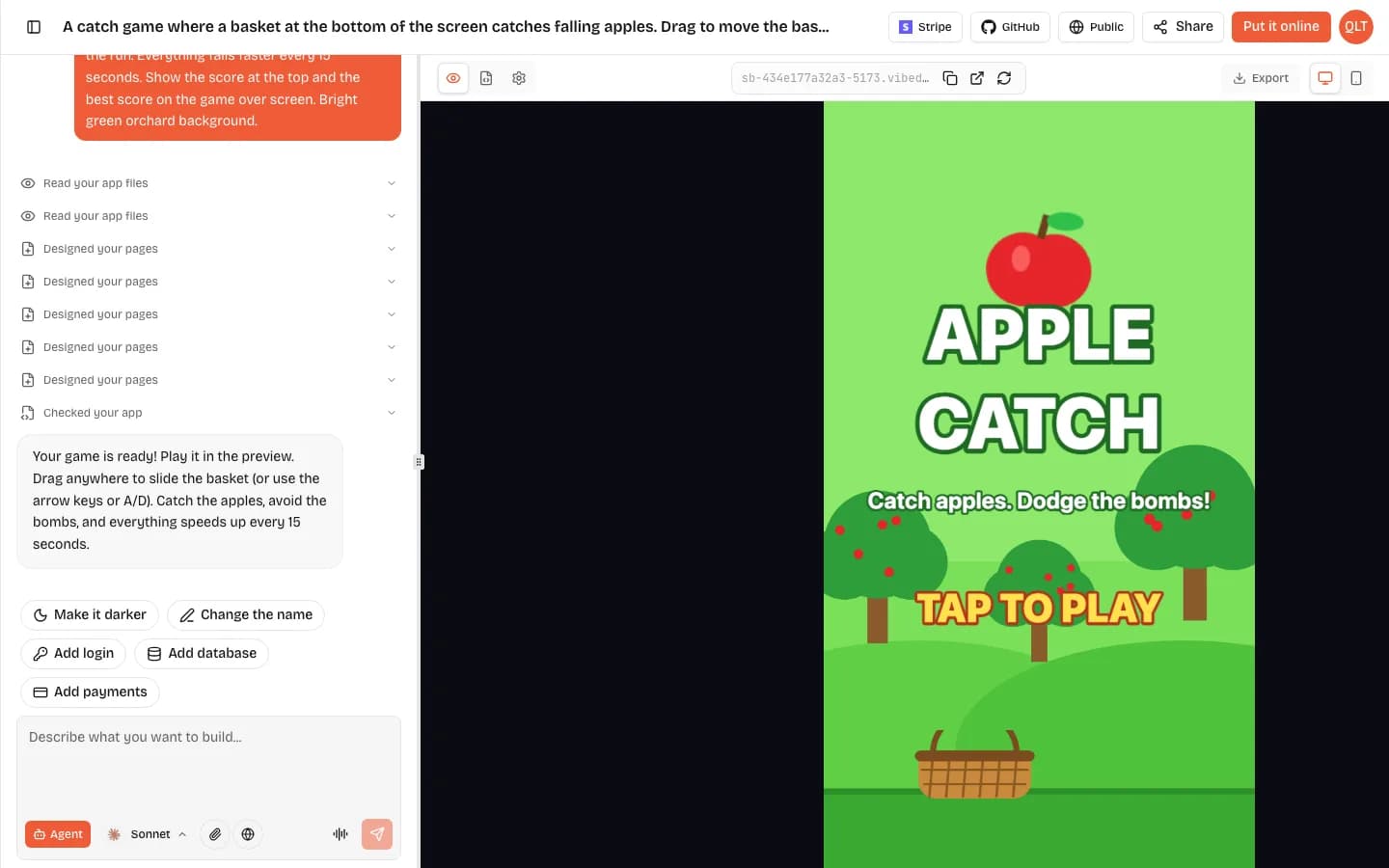
It also added two things we did not ask for: a SPEED counter in the top corner and a FASTER! banner each time the 15 second ramp kicks in. Dragging anywhere on the screen moved the basket, and the AI's reply said arrow keys or A and D work on a laptop. The screenshot below was taken on a phone-sized screen about 20 seconds into a run.
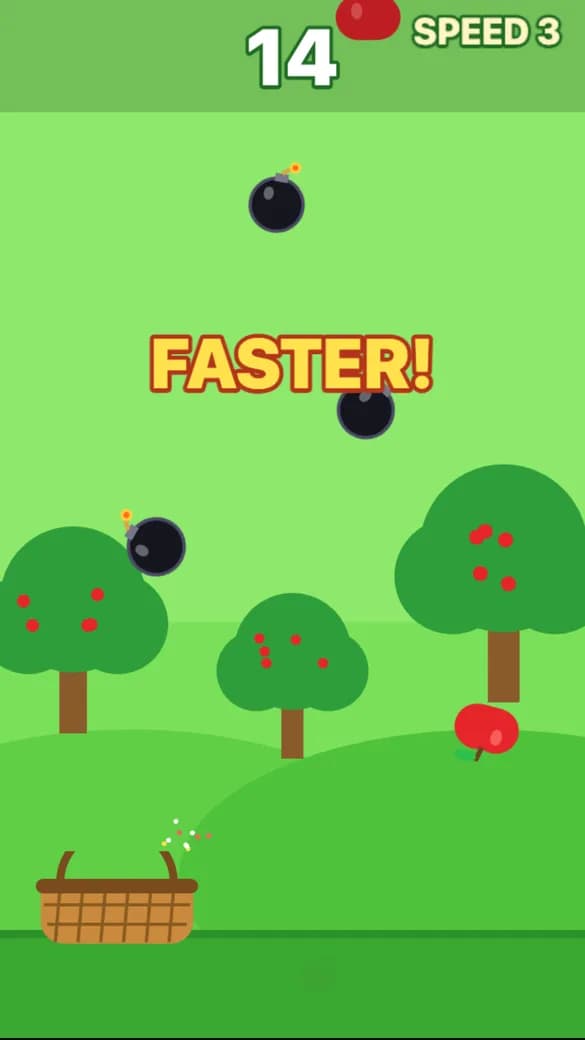
The one thing we would change is the bomb rate. By speed 3 there were more bombs than apples on screen, which makes runs short for a new player. That is a one-line fix: ask for one bomb for every four apples. The rest of this guide is about that kind of tuning.
Why arcade games are the easiest to get right
- One verb. Move, shoot or tap. Players understand it without a tutorial.
- Short rounds. A run of 30 to 90 seconds means people press play again.
- A number to beat. The score is the story, so you do not need levels or dialogue.
- Easy to tune. Most of the feel comes from a few numbers: speed, spawn rate and how fast those grow.
- Made for phones. One thumb and a portrait screen is all an arcade game needs.
Two more prompts, a dodger and a shooter
A dodger is the other easy arcade game. We did not build this one for the page, but it uses the same shape as the catch prompt:
An arcade game where a small white ship at the bottom of the screen dodges falling meteors. Drag to move left and right. Meteors start slow and fall faster every 15 seconds, and more of them appear over time. One point for every second you survive. Three lives shown as hearts. Shake the screen and flash red when you get hit. Game over shows your score and best score. Dark purple space background with stars.
Every VibeDream game starts from the same Phaser 3 template, so you get a title screen, a score that stays on screen and a game over screen with your best score. The art is drawn in code, which is why the apples and the basket above are flat shapes. Switch the preview to phone view before you ask for changes.
Or a space shooter
A vertical space shooter. The ship moves by dragging and fires automatically. Waves of small enemies fly down in patterns. Each wave is faster than the last. Every fifth wave has a boss with a health bar. Enemies drop a power-up that gives triple shot for 10 seconds. Ten points per enemy, 200 for a boss.
Auto-fire matters on phones. Holding a fire button while dragging to steer is awkward with one hand, so most mobile shooters fire for you and let the player focus on moving.
Build a difficulty curve people want to replay
The difference between a game people play once and a game they play twenty times is the difficulty curve. Too flat and it gets boring. Too steep and people quit. A simple shape that works for most arcade games:
- First 10 seconds: almost nothing can hit you. Let the player learn the controls.
- 10 to 30 seconds: the real game. Steady pressure, easy to survive with attention.
- 30 to 60 seconds: speed and spawn rate climb. Most players die somewhere here.
- After 60 seconds: hard, but fair. Good players can push on, which makes a top score worth something.
You can describe this to the AI in plain words. Make the first 10 seconds easy, then ramp up so most people die around 45 seconds, is a perfectly good prompt. Then play five rounds and see where you die. If you always die before 20 seconds, ask for a gentler ramp. If you get bored before you die, ask for a steeper one.
Fairness checks
- Nothing should spawn on top of the player.
- There should always be a gap you can get through.
- Hits should be a little forgiving. Ask for a smaller hitbox than the ship's drawing if near misses feel like hits.
- Speed should cap at some point, so the game does not become impossible.
Scoring and leaderboards
A score is only fun if it can be compared. That is why arcade games and leaderboards belong together.
- Time survived is the simplest score and works for dodgers.
- Points per hit or catch works for shooters and catch games.
- Combos reward skill: ask for double points when you hit three enemies without missing.
- Near-miss bonuses make dodging exciting: ask for 5 bonus points when a meteor passes very close.
On VibeDream, every game sends its score to the platform once at the end of each run, and when the game is online its play page shows a top scores leaderboard next to the game. Your best score is also saved in the player's browser and shown on the game over screen. Keep scores as whole numbers and keep the rules the same for everyone, and the leaderboard will mean something.
Make every hit feel like something
Arcade players feel a game before they understand it. Small reactions to every important moment make a simple game feel polished. Game designers call this juice, and it is cheap to add by prompt.
- A short screen shake and a red flash when the player gets hit.
- A burst of particles when an enemy is destroyed or a meteor breaks.
- A quick pop in size when the score goes up, so the eye notices it.
- Short sounds for pickup, hit and game over. Mobile browsers start sound after the first tap, which the TAP TO PLAY screen takes care of.
- A slow-motion moment on the final hit before the game over screen.
Add these one or two at a time. Too many effects at once make the screen hard to read, which hurts more than it helps.
Phone controls
VibeDream arcade games are portrait first and built for one thumb. Movement games use a drag-anywhere joystick, so the player's thumb never has to find a small button. Games that need an action, like a shield or a bomb, get one large action button. On a laptop the same game works with arrow keys or WASD and space.
Test on your own phone before you share. If your thumb covers the ship, ask for the ship to sit higher, or for the touch area to move the ship from a distance. If the game feels cramped, ask for fewer, bigger meteors.
Share it and let friends remix it
Putting a game online costs 5 credits, and each update costs 5 again. The game gets a vibedreams.ai link and a play page with the leaderboard beside it. When someone shares that link, the preview card shows the current top score, so a group chat dare works well. Signed-in players can remix the game into their own copy. If you plan to collect several games on one site, read how to make a game website before you publish the first one.
Ideas for your next arcade game
- Catch the falling pizza slices, avoid the pineapple.
- A whack-a-mole where the moles are meeting invites, faster as the clock nears 5pm.
- A brick breaker with power-ups that change the paddle size.
- A snake game where the snake speeds up with every apple.
- An endless runner where you tap to switch lanes.
When you want something with more structure, try a platformer with levels, or a slow-burn idle game with upgrades. For how the code behind these games works, see our Phaser 3 explainer, and for the full build flow, the getting started guide.