
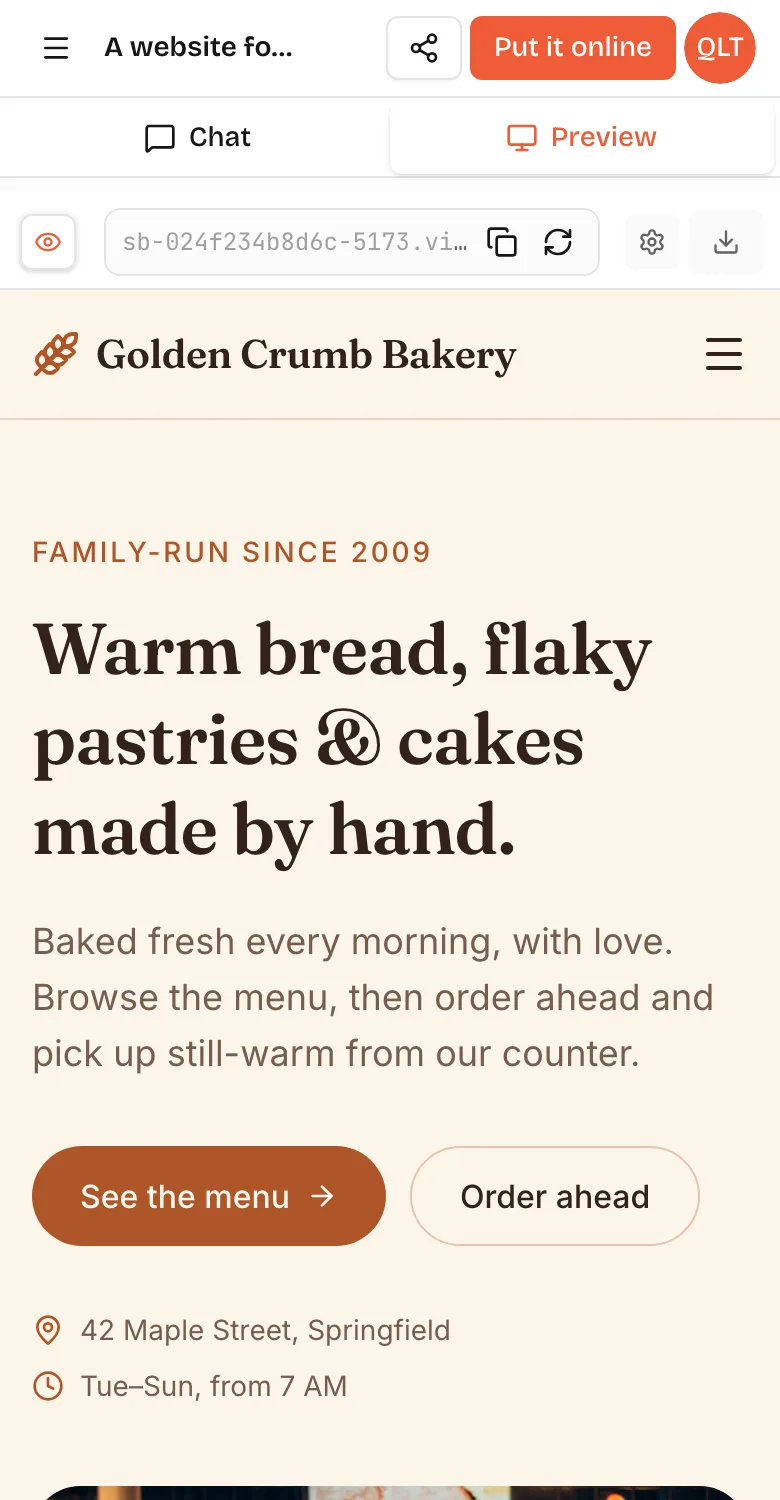
Making a simple app is no longer hard. With an AI app builder, someone who has never coded can describe a booking page, habit tracker or small game and have a working version in an afternoon. What is still hard is everything around the code: deciding exactly what the app should do, making it safe with real people's data, getting anyone to use it and keeping it working. If you learn to code from scratch, expect months before you build something comparable; with no-code, expect days to weeks of learning a platform.
So the honest answer is: building is easy now, but making an app that matters is still work. Here is where the difficulty actually sits.
Difficulty by route
- Learn to code: hard at first. Expect months to get comfortable with a language, a framework, databases, hosting and debugging. Highest ceiling, longest ramp.
- No-code platform: medium. No programming, but you learn an editor, data types and workflow logic. Days to weeks for a first real app.
- AI app builder: easy to start. You describe the app in plain words and steer a live preview. Hours for a first version. The hard part shifts to clear thinking and testing.
- Hire someone: easy for you technically, hard in other ways: writing a clear brief, choosing well, managing scope and budget.
What makes apps hard
Before AI, most difficulty came from these, roughly in this order.
- Turning a fuzzy idea into exact screens and rules.
- Learning a language and framework well enough to express those rules.
- Data: designing what to store, and keeping it consistent.
- Accounts and permissions: who can see and change what.
- Making it work on many screen sizes and browsers, or two mobile platforms.
- Hosting, domains and HTTPS.
- Debugging: finding out why something does not work.
- Security: keeping keys and personal data safe.
- Maintenance: updates, changes and fixes after launch.
- Distribution: getting people to find and use it.
Hard parts AI removes
AI app builders have made several of these much easier, sometimes close to invisible.
- Syntax and frameworks. You do not need to know React or Python. On VibeDream, apps are built as React + FastAPI and games with Phaser without you choosing anything.
- Layout and responsive design. You describe the look, check the phone view, and ask for changes in words.
- Boilerplate. Forms, lists, navigation, and basic data saving appear from a sentence.
- Debugging, mostly. Paste an error into the chat and the AI usually finds the cause.
- Running the app. The preview runs in its own space while you build; there is nothing to install.
- Hosting and HTTPS. On VibeDream, Put it online publishes to a vibedreams.ai address with HTTPS in a few minutes, and connecting your own domain takes a TXT and a CNAME record.
That is a big shift. For a simple idea, the technical work that used to take weeks can now take an afternoon.
Hard parts AI does not remove
These stay hard whatever tool you use, and they decide whether your app succeeds.
- Knowing what you want. The AI builds what you describe. Vague requests give vague apps, and "build me Airbnb" gives a shallow version of everything.
- Making decisions. Should guests book without an account? What happens when two people book the same slot? Someone has to decide.
- Security and privacy. AI tools often get access rules wrong unless asked. You need to test that private data stays private and keys stay on the server.
- Payments and money. Refunds, failed payments and taxes need care. On VibeDream, one-tap payments are coming soon. Today, real card payments mean connecting your own Stripe account.
- Complex logic. Scheduling, pricing rules and integrations with older systems still take careful thought and testing.
- Getting users. A working app with no users is still a hobby project. Distribution is its own job.
- Keeping it going. Every change needs testing, and outside services change their APIs over time.
Where first-timers actually get stuck
The stumbles in a first app are surprisingly predictable. None of them are about code, and each has a fix you can type in one sentence.
- The double booking. Two people grab the same slot because nobody decided what should happen. Decide the rule, then say it: "If a slot is already booked, hide it and show the next free one."
- The admin page that is only hidden. The link is gone from the menu, but the address still opens for anyone. Log out, paste the address into the browser and see what happens.
- Data that lives in one browser. The app looks like it saves, but the bookings only exist on your laptop. Ask: "Save bookings on the server, not in the browser."
- The phone layout. Everything looks right on a laptop and the buttons overlap on a phone. Check the phone view after every change, not at the end.
- The fix that breaks yesterday's feature. Keep a short list of the flows that must always work, such as booking and cancelling, and retest them after each big change.
- Preview versus live. You fixed it in the preview, but the live site still shows the old version. On VibeDream, open Put it online and press Update it.
If you want hours and steps rather than pitfalls, our guide to how long it takes to build an app walks through a timed outline of the same booking page.
What you need to start
- An idea small enough to describe in a paragraph.
- One sentence on who the app is for and the main thing it must do.
- A sketch of the first screen, even on paper.
- A tool: an AI app builder if you want the fastest route, a no-code platform if you like visual editors, a course if you want to learn to code.
- A budget for the tool and running costs. VibeDream plans start at $49 a month and there is no free plan; other builders have free tiers with tight limits.
- A few real people willing to try it and tell you the truth.
You do not need a Mac, a developer account or a computer science degree for a web app. You do need patience and the habit of testing everything.
How to make it easier on yourself
- Start from a template when one fits. A finished waitlist or landing page you change by chatting is easier than a blank screen.
- Build for yourself first. You know exactly what feels wrong, which makes every follow-up prompt sharper.
- Change one thing at a time, and check it on a phone before moving on.
- Keep a short list of decisions, such as "guests can book without an account", so you and the AI stay consistent.
- Ask the AI to explain anything you do not understand, especially around logins and data.
- Put a rough version online early and share it with three people. Their confusion shows you what to fix next.
- Save a working version before big changes. On VibeDream, the live site stays on the version you last published until you press Update it.
Signs your app will be harder than average
- It handles money, health or children's data.
- It needs native phone features, such as background tracking or Bluetooth.
- It must connect to an old internal system.
- Many user types with different permissions.
- Real-time features, such as live chat or multiplayer games.
- Strict compliance rules in your industry.
None of these make it impossible. They mean you should plan for more testing, and possibly paid help for reviews.