
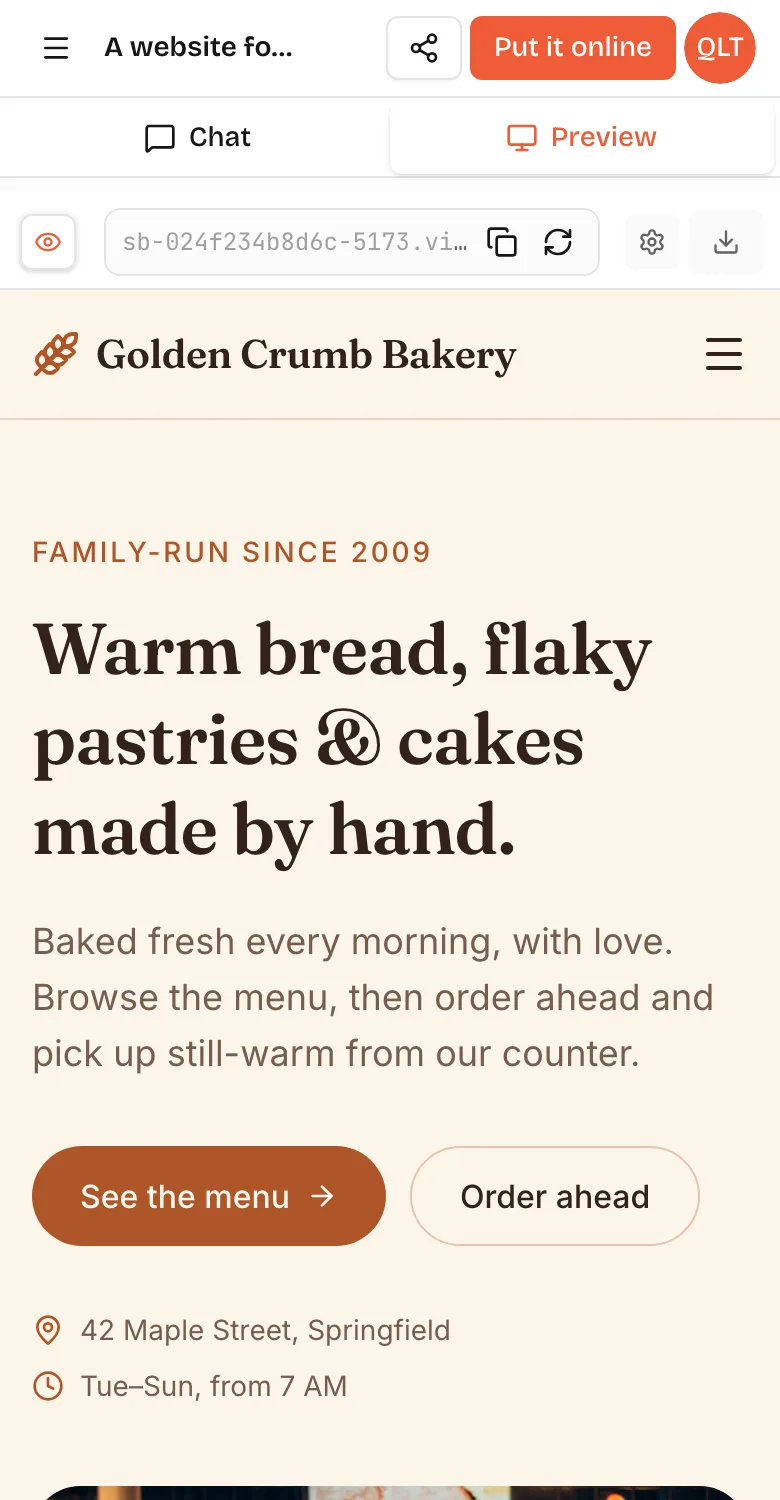
How to make a game on mobile comes down to picking a tool that works fully on a phone: a block-coding app like Pocket Code, an engine with a mobile app like GDevelop, or an AI game maker that runs in your phone's browser, like VibeDream, where you describe the game, play it in a preview tab and share a link. You can build, test and share a real game this way without touching a computer. What you cannot easily do from a phone is publish a native app to the App Store or Google Play, and this guide is clear about that too.
Checked: Oct 2026. Details on other tools come from their official sites.
What you can and cannot do on a phone
Works well on a phone:
- Short 2D games: dodgers, catch games, clickers, matching games, quiz boards, simple platformers.
- Describing a game and changing it with words or voice.
- Testing, since the phone is the device most people will play on anyway.
- Sharing a link to a group chat the moment it works.
Harder or not possible on a phone:
- Big games with many levels, detailed art or long code files. Small screens make editing slow.
- Native app store builds. Making an iOS or Android app for the stores usually needs a computer, developer accounts and store review.
- Some advanced features in many tools are desktop only. Check before you rely on them.
If what you want is a game that friends can play from a link, a phone is enough.
Your options compared
Pocket Code
Pocket Code is a free, open source app from the Catrobat project for making games, animations and stories with code blocks, directly on Android or iPhone. It is a great way to learn how game logic works. You build everything yourself, block by block, so it is slower than describing a game, and that is the point if learning is the goal.
GDevelop
GDevelop is an open source game engine with a visual event system. Its download page lists Windows, macOS, Linux, a web version, and apps on the App Store and Google Play. It has an AI helper. Its free plan allows one Android export a day, and iOS export is listed on its higher plans. The editor is detailed, so a tablet is more comfortable than a phone.
AI game makers in the browser
AI game makers write the game for you from a description. Rosebud AI runs in the browser, though its pricing page marks the code tab and code download as desktop only. Astrocade has a browser version and links to an app from its site. VibeDream runs in your phone's browser, with the chat and the live preview as two tabs, and builds games that are designed for phones in the first place.
For a deeper look at the AI options, see Rosebud AI alternatives.
Build a game on your phone with VibeDream
Here is the full flow, using only a phone. On a phone the workspace has two tabs at the top, Chat and Preview, so you write in one and play in the other.
If you have never used the builder before, the getting started guide shows the phone layout with a screenshot, including where the Chat and Preview tabs and the Put it online button sit. Building uses credits from your plan, and your balance is shown in the app.
1. Describe the game
Start a new project and type, or tap the microphone and say, what you want. Keep it short and specific. For example: a game where a dragon flies up and collects stars and dodges clouds. Drag to move. It gets faster every level. Show the score and a game over screen with the best score. You can also attach a photo of a drawing, which is lovely when the idea comes from a child.
2. Play it in the Preview tab
Switch to Preview while it builds. VibeDream builds every game with Phaser in a 720 by 1280 portrait layout that scales to the screen, so it fills a phone held upright. You get a title screen, the game and a game over screen. Play a few rounds before you change anything.
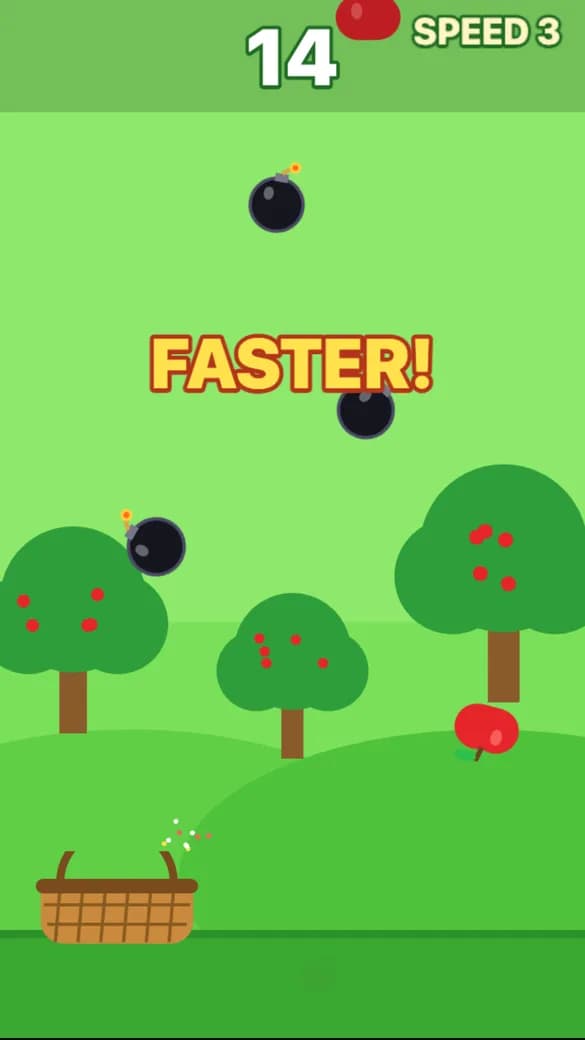
That game came from a single message: a basket catches falling apples, bombs end the run, everything gets faster every 15 seconds. The build took about 70 seconds and 7 credits. We sent it from a laptop, but the prompt box and the Preview tab work the same way on a phone.
3. Change it, one thing at a time
Go back to Chat and ask for one change: make the dragon bigger, add a power-up, make the clouds slower at the start. Then play again. One change per message makes it easy to see what each one did, and easy to undo if something breaks.
4. Put it online
When you like it, tap Put it online, pick a vibedreams.ai address and publish. It takes a minute or so, costs 5 credits, and comes with HTTPS. Your game now has a link and its own play page with a leaderboard.
Touch controls that feel right
Games made on a phone are mostly played on phones, so controls matter more than graphics. VibeDream games come with touch controls built for one thumb, and you can tune them in plain words.
- Drag to move. A joystick appears wherever your thumb lands, so you never hunt for a button.
- One big action button for jumping or shooting, used by platformers and shooters.
- Tap targets for puzzle and matching games, at least the size of a fingertip.
- Keyboard controls are added as well, so the same game works on a laptop later.
Prompts that fix common control problems:
- My thumb covers the player. Move the player higher up the screen.
- Make the jump button bigger and move it to the bottom right.
- Make the joystick less sensitive.
- Fire automatically so I only have to steer.
Playtest it properly
The preview is close to the real thing, but test the online version too. Open your game's link in your phone's normal browser, outside the builder, and check:
- Does it fit the screen with no cropped edges, in portrait?
- Does sound start after the first tap? Phones block sound until you touch the screen.
- Can someone who has never seen it understand the goal in five seconds?
- How long does a first round last? Under 20 seconds usually means it is too hard.
- Hand it to one other person and watch them play without explaining anything.
Share it
Copy your game's link into a group chat, a story or a class page. The play page shows the game next to its top scores, and the link preview shows the current top score once someone has set one, which makes a good dare. People who sign in can remix your game into their own copy and change it with a prompt.
Want the game on your own address, or a page with several games? See how to make a game website. Connecting your own domain uses two DNS records, which you can add from your registrar's site on a phone too.
What still needs a desktop
A few things are easier or only possible on a computer. On VibeDream, the Code tab and GitHub sync only show on a desktop screen. You can still download your project from a phone. None of that is needed to build, play and share a game. When you want more ideas to try, the arcade game maker and platformer game maker guides are both written so you can follow them on a phone.