
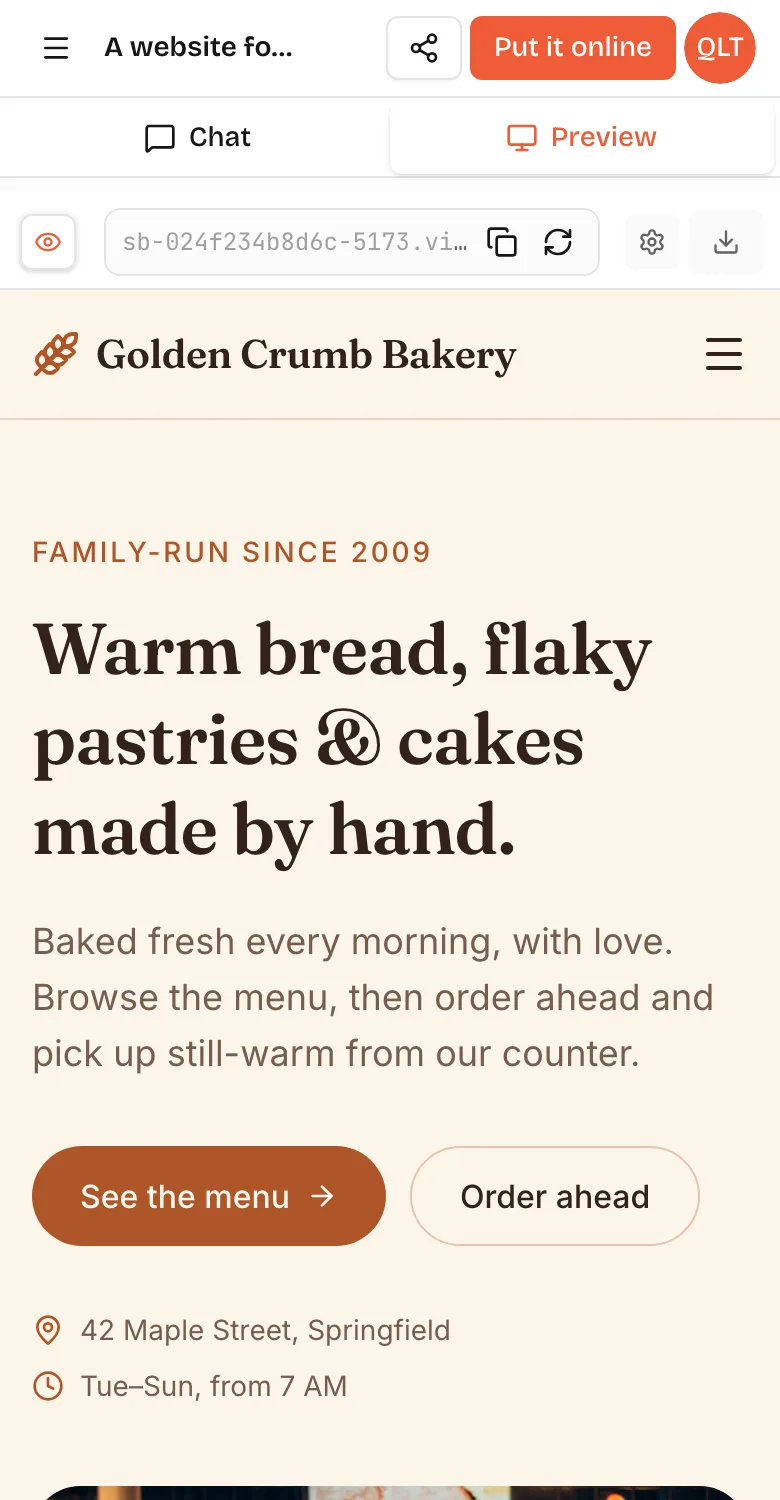
A web app is a piece of software you use inside a web browser, on a computer or a phone, without installing anything. Gmail, Google Docs, Canva, Figma, Notion and online banking are all web apps. Unlike a plain website that mostly shows information, a web app lets you do things: sign in, create and edit content, save data and get results that are personal to you. It runs on a server and in your browser at the same time, and you reach it with a link.
Web app vs website
The line is blurry, but the difference is about what you do there.
- A website is mostly for reading: a restaurant's menu, a news article, a company's About page. Everyone sees roughly the same thing.
- A web app is for doing: booking a table, writing a document, tracking a habit, managing invoices. What you see depends on who you are and what you have saved.
Many sites are a mix. A store's product pages are website-like; the cart, checkout and account pages are a web app. Technically, a web app almost always has a backend, server code and a database that remember things between visits, while a simple website can be static files.
Web app vs native app
A native app is installed from an app store and built for one platform, such as iOS or Android. A web app runs in the browser on any device. In practice that means no install, instant updates for everyone, and distribution by link or QR code instead of store listings. Native apps win on deep device access, background work and store discovery.
Which one to build first is a bigger question, and our web app vs native app guide answers it with fees, features and a worked example.
Ten everyday web app examples
- Email: Gmail and Outlook on the web.
- Documents: Google Docs and Microsoft 365 online.
- Design: Canva and Figma.
- Notes and wikis: Notion.
- Project tools: Trello and Asana.
- Banking and payments dashboards.
- Booking pages for salons, clinics and classes.
- Online stores' carts and checkouts.
- Internal dashboards that track orders or support tickets.
- Small browser games you play from a link.
Most of these also have native apps, but the web version is often where people start.
How a web app works
A web app has two halves that talk to each other.
- The frontend runs in your browser. It draws the screens and reacts to clicks. It is usually built with HTML, CSS and JavaScript, often with a framework like React.
- The backend runs on a server. It stores data, checks who you are and talks to other services. It might be written in Python with FastAPI, or in Node, Go or many other languages.
When you press Save, the frontend sends a request to the backend's API; the backend checks it, stores the data and replies; the frontend shows the result. HTTPS encrypts that conversation, and a domain such as app.example.com tells the browser where to find the server.
How to build a web app without code
You have three realistic routes if you do not write code.
- A no-code platform such as Bubble or Glide, where you build screens and logic visually.
- A backend-as-a-service such as Supabase or Firebase, paired with a front-end builder.
- An AI app builder, where you describe the app and the AI writes the code and runs it.
Here is the AI route on VibeDream, which builds web apps as React + FastAPI.
- Start a new project and describe the app: "A habit tracker where I add habits, tick them off each day and see my streak. Saves my data. Simple and colourful." You can type, record a voice note or attach a sketch.
- Watch the live preview fill in, usually within seconds of starting. Click through every screen.
- Switch between desktop and phone views. The same app works on both, because it is one web app, not two builds.
- Change anything by chatting: "Make the tick buttons bigger on phones."
- Tap Put it online to publish to an address like habits.vibedreams.ai with HTTPS. It costs 5 credits and usually takes 1 to 3 minutes. Scan the QR code to open it on your phone.
- Connect your own domain later with a TXT and a CNAME record.
You can also start from a template, such as the Aesthetic Waitlist, which already saves signups and shows a live count. Either way, the code is yours to download as a ZIP or sync to GitHub.
What a web app costs to run
Running costs are one of the web's quiet advantages: one version to host and no store fees.
- Hosting for the frontend and backend. Small apps fit on modest plans; costs rise with traffic and stored data.
- A domain, if you want your own address, renewed yearly at a registrar.
- Outside services the app calls, such as email sending, maps or AI models, usually billed by use.
- Your time, or a developer's, for changes and fixes.
On VibeDream, hosting, HTTPS and a vibedreams.ai address are part of the plan, which starts at $49 a month. Building uses credits and each publish costs 5 credits. Outside services you connect are billed by those providers.
When a web app is the right choice
- You want to launch quickly and test whether people use your idea.
- Your users are on a mix of phones and computers.
- You will change things often and do not want to wait for store reviews.
- You share by link, for example from social media, email or a QR code at a counter.
- You want one codebase, one host and one set of costs.
If you later need native features or a store listing, a working web app is the best brief you can give a mobile developer.