
Rosebud AI is a browser-based AI game maker: you describe a game in plain English, its assistant writes the code, and you can publish the result to a link that anyone can play. It is a good fit if you want to make 2D or 3D browser games, generate your own sprites and models along the way, and you are happy for your game to live on Rosebud's own hosting. It is a weaker fit if you need the source code on a cheap plan, your own domain, or a project that is more app than game. Below are its plans as listed today and the points where people usually outgrow it.
Checked: Oct 2026. Every price and plan detail below comes from Rosebud's official pricing page and its own blog, read on 25 October 2026. We did not build a game on Rosebud for this review, so there are no Rosebud screenshots or timings here. Rosebud changes its plans often, so check the pricing page before you pay.
The short verdict
Rosebud AI is one of the most complete tools for making a game from a prompt. It does more than write code: it also has asset tools for 2D sprites, sprite sheets, 3D models and skyboxes, plus genre makers for things like RPGs, visual novels and interactive stories. The free plan is real and needs no card, which makes it easy to try.
The trade-offs are about ownership and price. Viewing and editing code in the browser starts on the $15 plan, commercial rights and removing Rosebud branding start at $30, and downloading your project code starts at $50 a month. If you only want to play around and share links with friends, none of that matters. If you plan to sell or move your game, it matters a lot.
What Rosebud AI makes
The Rosebud homepage asks you to describe your game or pick a template, then lists a set of focused makers and generators. Here is what is on offer today, in Rosebud's own wording where it helps:
- A 3D Game Maker and a Vibe Coding Tool for general games
- Asset generators: a 2D Asset Generator, a Sprite Sheet Generator, a 3D Model Generator and a Skybox Generator
- Genre makers: an RPG Maker, a Visual Novel Maker, a Cozy Games Maker and an Interactive Story Maker
- AI NPCs and AI character chat, so characters can talk back to the player
- Templates you can start from instead of a blank prompt
- Free game hosting, so a finished game gets a playable link
Under the hood, Rosebud's own blog says 2D games use Phaser, the open source HTML5 game framework, and its posts mention both Babylon.js and Three.js for 3D work. In practice that means your game runs in a web browser on a laptop or phone, with no install. If you want to know what Phaser is and why so many AI game tools use it, our Phaser 3 explainer covers it.
The assistant inside the editor is called Rosie. You chat with it to make changes, and Rosebud's guides describe publishing as a button that gives the game a link.
Rosebud AI pricing in October 2026
Rosebud prices its plans in credits. Every AI action, from writing code to generating an asset, spends credits. The monthly plans listed on the official pricing page on 25 October 2026 were:
- Free (called Newbie): $0, 8,000 credits a week. Remix and share games, basic asset generation, AI character chat, with project limits. No credit card needed.
- Indie Dev: $15 a month, 100,000 credits. Adds private projects with remixing turned off, higher quality assets and chat, the browser code tab (desktop only) and rollover of unused credits.
- 10x Dev: $30 a month, 300,000 credits. Adds commercial rights and removes Rosebud branding from hosted pages.
- Pro: $50 a month, 1,000,000 credits. Adds downloadable project code and a Windows build for Steam (both desktop only), plus managed infrastructure for scale.
- Scale: $100 a month, 2,000,000 credits. Adds auto-scaling hosting and the top tier of assets and AI chat.
At the time of checking, the page also advertised 10,000 daily refresh credits on paid plans as a limited bonus. Treat that as a promotion, not a permanent part of the plan. The page did not list yearly prices.
Is Rosebud AI free?
Yes, there is a free plan, and it is more generous than many AI tools. You get 8,000 credits that refill each week in eligible regions, and unused weekly credits expire at the reset, so you cannot bank them. Free games can be remixed and shared, which means other people can copy your project. If you want a private project, that starts on Indie Dev.
What a credit buys
Rosebud does not publish a fixed price per action, and the cost depends on what you ask for. Generating a 3D model or a high quality asset uses more than a small code change. The honest way to budget is to build one small game on the free plan, watch how fast the weekly credits go, and then pick a plan. Do not assume a plan size from the headline number alone.
What Rosebud AI does well
- It is built only for games. The editor, templates and assistant all assume you are making something playable, so you do not have to explain basic game ideas like a score or a game over screen.
- Assets are part of the same tool. Making sprites, sprite sheets, 3D models and skyboxes next to your code saves a lot of hunting through asset stores.
- There is real range. 2D, 3D, visual novels, RPGs and story games are all on the menu, which few prompt-to-game tools match.
- The free plan is good for learning. Weekly credits with no card make it easy for a student or a curious parent to try it.
- Remixing is a culture, not an afterthought. Public projects can be copied and changed, which is a good way to learn how a game is put together.
Where Rosebud AI stops
None of these are hidden. They are all stated on the pricing page, but they are easy to miss when you are excited about your first game.
- Code ownership costs extra. You can view code in the browser from Indie Dev, but downloading your project code needs Pro at $50 a month. Moving a game elsewhere on a cheaper plan is hard.
- Commercial use needs 10x Dev. Commercial rights and removing the Rosebud branding start at $30 a month. Check this before you put a game in front of paying customers.
- Several tools are desktop only. The code tab, code download and Windows export are marked desktop only, so a phone is fine for playing and prompting but not for everything.
- Hosting is Rosebud's hosting. Games are hosted for you, which is convenient, but the pricing page does not mention connecting your own domain.
- It is a game tool first. If your idea is half game and half app, such as a quiz with sign-ups, a booking flow or a shop, you will hit the edges of a game-only tool.
- Free projects are public. On the free plan your game can be remixed. That is great for learning and less great if your idea is something you want to keep.
Rosebud AI vs VibeDream
VibeDream is an AI builder that makes both apps and games. Games are built with Phaser, the same 2D framework Rosebud uses for its 2D games, and apps are built with React and FastAPI. The two tools overlap on 2D browser games and differ almost everywhere else.
- What you make: Rosebud covers 2D, 3D and story games plus asset generation. VibeDream makes 2D Phaser games that are portrait first with touch controls built in, and full web apps.
- Sharing: a Rosebud game gets a hosted link. A VibeDream game gets its own play page with a leaderboard, and signed-in players can remix it into their own copy.
- Your address: VibeDream's Put it online step gives your project a vibedreams.ai link, and you can connect your own domain with a TXT and a CNAME record. HTTPS is set up automatically.
- Your code: on VibeDream you can see the code, download it as a ZIP or sync it to GitHub on any paid plan. On Rosebud, code download starts on Pro.
- Price: VibeDream has no free plan. Plans start at $49 a month for All Access Mini with 60 credits, or $97 a month for All Access with 150 credits (see pricing). Rosebud starts free and its first paid plan is $15.
- Assets: Rosebud generates sprites, models and skyboxes. VibeDream games draw their art in code by default, and you can attach your own images in the chat.
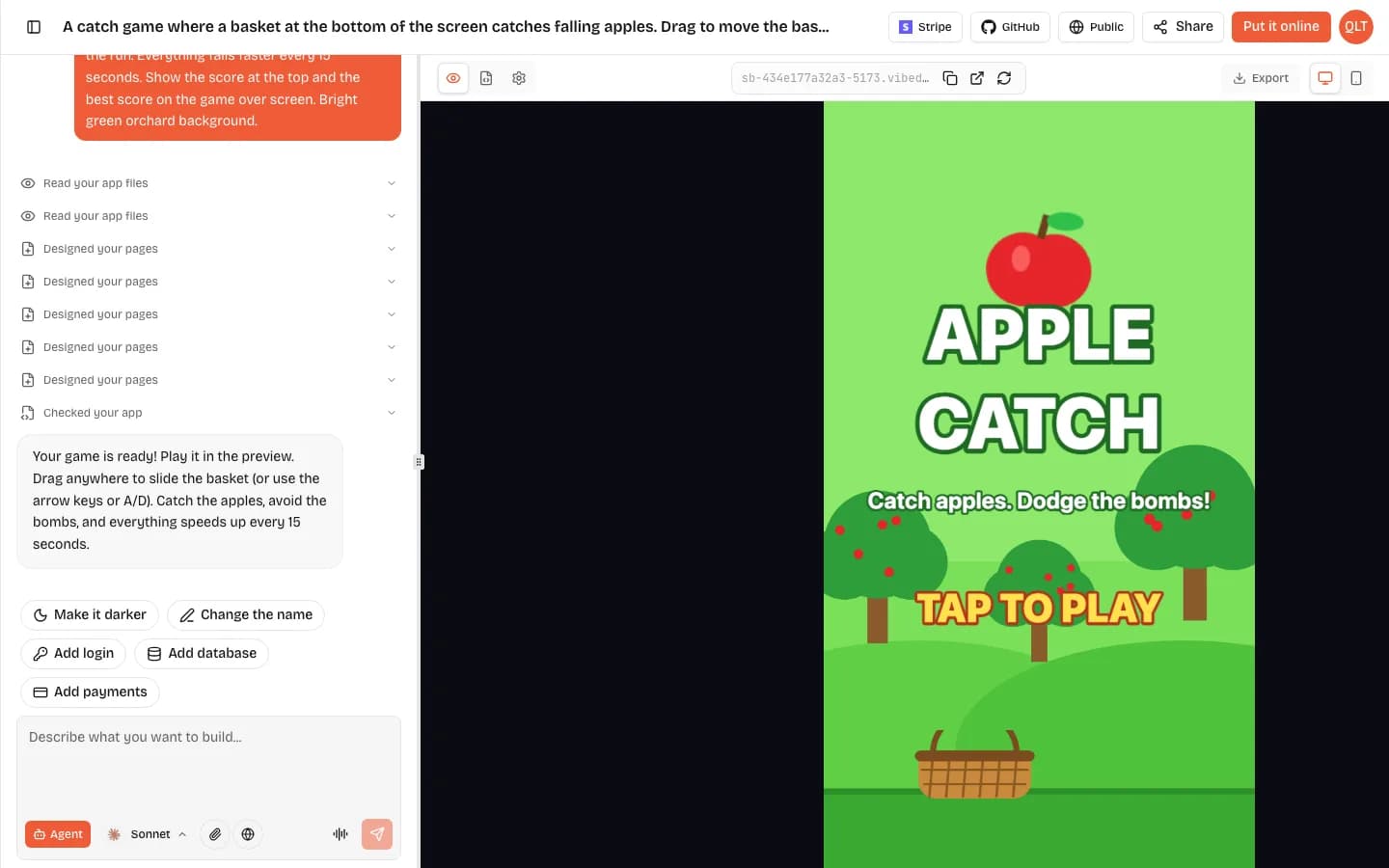
For a sense of the VibeDream side, we built a small catch game on 25 October 2026. The preview was playable in about 70 seconds and the build used 7 credits of the 60 that come with All Access Mini. A Rosebud build is priced in its own credits, which are not comparable one to one.
If you want the cheapest way to make a lot of games and generated art, Rosebud wins. If you want a game that sits next to an app, uses your own domain, and keeps its code in your GitHub, VibeDream is the closer fit. You can read how the VibeDream build flow works step by step in the getting started guide.
How to test Rosebud fairly before you pay
Reviews go stale fast in this space, so the best test is your own. Use one prompt on Rosebud and on any other tool you are considering, then compare the results on the same phone and the same laptop.
- Write one short, specific prompt. For example: a cat that jumps between clouds, collects fish, and the clouds fall faster every 20 seconds. Show a score and a game over screen.
- Time the first playable version, not the prettiest one.
- Play it on a phone. Check that it fits the screen and that you can control it with a thumb.
- Ask for three changes in a row, such as faster, a boss, and a new colour scheme, and see whether each change breaks anything.
- Publish it and send the link to one friend. Check what they see before signing in.
- Note how many credits the whole test used, so you can price a month of real work.
If you run this test on VibeDream too, our guide on how to make a game website shows what happens after the game works: the play page, the leaderboard and your own domain.
Who should pick something else
- If you want a game that lives inside a wider web app or site, pick a builder that makes apps too, such as VibeDream.
- If you want to learn to code games properly, use Phaser directly with its free documentation, or a visual engine like GDevelop. Our Rosebud AI alternatives page compares these.
- If you mainly want to play and remix other people's AI games, a social platform like Astrocade may suit you better. See our Astrocade review.
- If you need a native mobile app store game, none of the prompt-to-browser tools are a direct route. Rosebud's Windows export targets Steam, not phones.
Our take
Rosebud AI is a strong, focused AI game maker with a free plan that is worth trying. It is the right pick for hobbyists, students and game jam projects that stay on Rosebud. Look carefully at the plan ladder before you build something you want to sell, because code download, commercial rights and branding removal each sit behind a different price. Whatever you choose, run the same prompt on two tools before you commit.